One payment. No automatic renewal. See current access options in Studio.
Which path is right for us? +
What matters to you
Live classes
DIY Family Studio
Who guides the learning?
A live instructor
A parent or guardian, using our guides
When do we make games?
At the confirmed class time
At your family’s own pace
What is included?
The sessions, projects and materials described for your course
Eight lessons, three game worlds, two learner profiles and 12 months of browser access
A simple first step
Ask about the CAD $39 taster
Play a sample and explore CAD $99 family access
Live courses and the annual DIY Studio plan are separate purchases.
LIVE ONLINE CLASSES · SMALL GROUPS
Find their first “I made this.”
Choose by experience first, then age. Enquire to confirm the instructor, schedule and final terms. All course prices below are in CAD, before applicable taxes.
✦
A SMALL FIRST STEP
Make-a-Game Taster CAD $39
One idea. One tiny game. 45 minutes. A parent joins the final five minutes.
Fully credited toward a core course booked within 14 days.
Checkpoints, game states, reusable events, timers, puzzle logic, accessibility and difficulty balancing. Beginners in this age band receive a short readiness check.
RETURNING MAKERS
Creator Club
A fresh challenge and a reason to keep building. For graduates who are ready to work more independently.
Our eight-week core courses turn an idea into something a child can play, improve and proudly explain.
01
WEEKS 1–2
Make it move
Connect input, movement, collisions and score. Get a simple playable loop working.
02
WEEKS 3–4
Make it work
Add a goal and a new mechanic. Notice a bug, try a fix and see what changes.
03
WEEKS 5–6
Make it yours
Sketch a level and build a personal project with rules and a clear purpose.
04
WEEKS 7–8
Make it better
Playtest, improve and present the game. Explain one choice that made it better.
SELF-PACED FAMILY LEARNING · AGES 8–11
A game studio for your kitchen table.
“What happens if we change this?” That is a great place to start. GamesPark Studio gives you a working game, a friendly lesson and room to try your own ideas together.
8guided lessons
3game worlds
121ready-made assets
CAD $99 / 12 months of hosted access
One adult account · Up to 2 learners · No automatic renewal
Before applicable taxes. See current access options in Studio. Browser Studio needs internet and a laptop or desktop. Completed games can be exported to play offline.
These three are original teaching demos. The two examples below use the actual GamesPark Studio game engine and project format. All five are demonstration projects, not student work or a promise of a particular class project.
MADE WITH GAMESPARK STUDIO
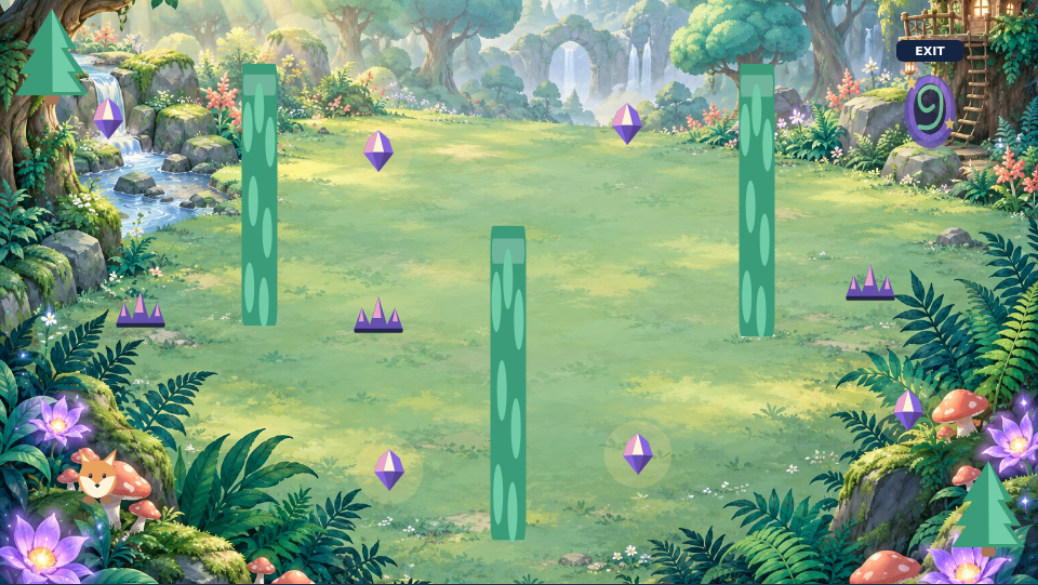
Starting template. Make it your own.
A ready-made world gets them playing. Changing the character, the route and the rules makes them a game designer. Play both versions and spot the differences.
Previews are captured from the playable games. Both projects use Studio’s Forest Maze template, existing tools and artwork. Optional music accompanies these demos. You can open the project files in Studio; saving requires active Studio access.
FOR THE GROWN-UPS
A clear plan. A little peace of mind.
Parents handle enrollment and access. Kids get a place to experiment, make mistakes and try again.
⌘
Bring a computer. Bring a little curiosity.
A laptop or desktop, keyboard, mouse or trackpad, and reliable internet. We confirm tools and device requirements before your live class. Ask about a Chromebook check.
First Game Lab starts at the beginning, with visual events and simple game rules. Builder Studio goes further; we check readiness before confirming a place.
How do we book? Are dates available now?
Send a class enquiry with your preferred course and schedule. We confirm availability, the instructor, dates and final terms before payment. The enquiry itself does not reserve a place or charge you.
Which tools and accounts will we need?
We confirm the tools, setup and account arrangements for the actual class before you pay. A parent or guardian handles consent and setup. A public game profile is not required just to make a class enquiry.
What if we miss a class?
The proposed course includes a private lesson recap and a catch-up task. Group classes are not recorded by default. We confirm any make-up options with your cohort schedule.
Is annual DIY Studio access included?
No. Live courses and the 12-month DIY Family Studio plan are separate. Your class confirmation explains the tools and course materials included in that course.
About DIY Family Studio
Do I need to know how to code to help?
No coding experience is needed for the beginner pathway. An adult guides the session using the lessons and teaching activities. Start with one small change, play the game and ask your child to explain what happened.
What does CAD $99 include?
Twelve months of hosted browser access for one adult and up to two learner profiles, eight guided lessons, three editable game worlds and a library of 121 assets. See current access options and applicable taxes in Studio. There is no automatic renewal.
Can we use Studio offline?
The editor, account and hosted saving need internet access. You can export a completed game as a playable HTML file and download editable project files as backups. The full Studio is not an offline download.
We bought an access card. Where do we start?
Ask the store to activate the card after payment. An adult then signs in or creates an account at GamesPark.ca/studio/#redeem and enters the private code. Keep your receipt and do not share the code publicly.
Is Windows or Mac software included?
No. Optional desktop editions are being tested separately. They are not included in a live class or Family browser purchase unless a future offer explicitly says so.
EVERY BIG IDEA STARTS SOMEWHERE
The next game they love could be the one they make.
Start with a live class, or make a little space to create together at home.